How to Find Backlinks to Any Website
Run the same domain through three backlink tools and you will get three different numbers. One user on SEO Review Tools put it plainly. Semrush showed about 1,500 backlinks for his site. Another checker showed about 2,300. He wanted to know which one was right.
The honest answer is that none of them sees every link. Each tool crawls the web on its own schedule and keeps its own index. Once you understand that, finding backlinks gets much easier.
This guide shows you how to find backlinks to your own site for free. You will also learn how to find backlinks of any competitor. Then you will turn both lists into a link gap you can act on. PitchBranch runs manual outreach campaigns, and good outreach starts with exactly this research.
Quick answer: how to find backlinks
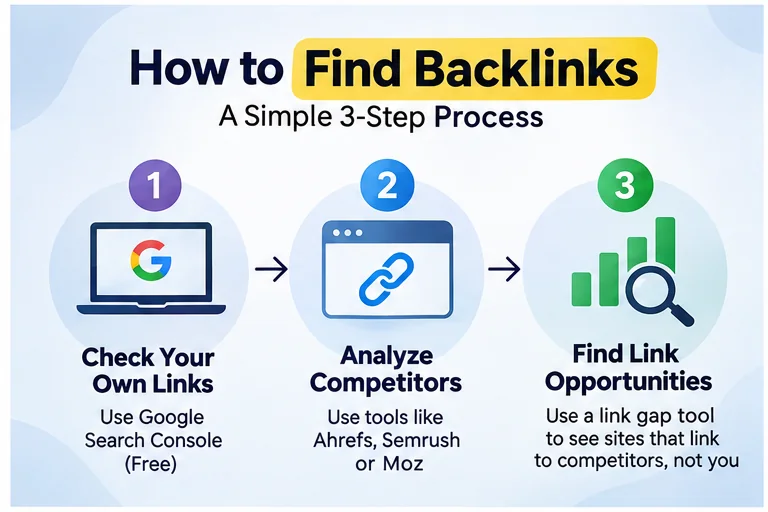
To find backlinks to your own site, open the Links report in Google Search Console. It is free and uses Google’s own data. For any other website, enter its domain in a backlink checker such as Ahrefs, Semrush, Majestic or Moz. Then compare competitors with a link gap tool to see who links to them but not to you.
Here is the short version by goal:
| Your goal | Best method | Cost |
|---|---|---|
| See who links to my site | Google Search Console Links report | Free |
| Check a competitor’s backlinks quickly | A free backlink checker | Free, limited rows |
| Get a full competitor link list | Ahrefs, Semrush or Majestic | Paid |
| Find sites that link to rivals, not me | Link Intersect or Backlink Gap | Paid |
| Spot mentions with no tool at all | Google search operators | Free |
What are you actually looking for when you find backlinks?
A backlink is a link from another website to yours. A referring domain is the website that link comes from. One site can send you many backlinks, so referring domains are usually the more useful count. When you find backlinks, you also see anchor text, link type and the page each link points to.
Keep four terms straight before you start:
- Backlinks: every individual link pointing at a site.
- Referring domains: the unique websites sending those links.
- Anchor text: the clickable words in the link.
- Link attribute: whether the link is followed, nofollow, sponsored or UGC.
New to the topic? Start with our explainer on what link building is and why it matters. This guide focuses on research, not on building links.
Method 1: How to find backlinks to your site in Google Search Console
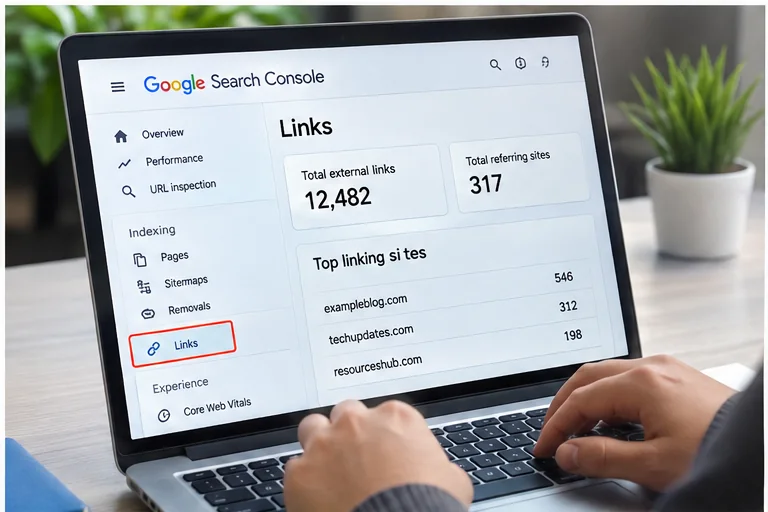
Google Search Console is the best free way to find backlinks to your own website. Open Links in the left menu, then review Top linked pages, Top linking sites and Top linking text. Click any row to drill down to the exact linking pages. Use the Export button to download the list.
Search Console only works for sites you have verified. It will not show competitor data. Still, it is the only source that reflects links Google itself has found.
Follow these steps:
- Open the Links report. Log in, choose your property and click Links near the bottom of the left menu.
- Review Top linked pages. This shows which of your pages earn the most external links. Click More to see the full table.
- Review Top linking sites. This lists the websites that link to you most. Google shows each one by its root domain, with subdomains folded in.
- Check Top linking text. This groups the anchor text other sites use. Look for your brand name, natural phrases and anything that looks spammy.
- Drill down. Click a page, then a linking site, to see the exact source URLs behind that relationship.
- Export the data. Use the export button to download external links as a CSV file or into Google Sheets.
Google documents each of these views in its Links report help page. Two limits matter. The report shows a sample of links rather than every single one, and it gives no quality metrics. You will not see authority scores or traffic for linking sites.
Method 2: How to find backlinks of any website with a free checker
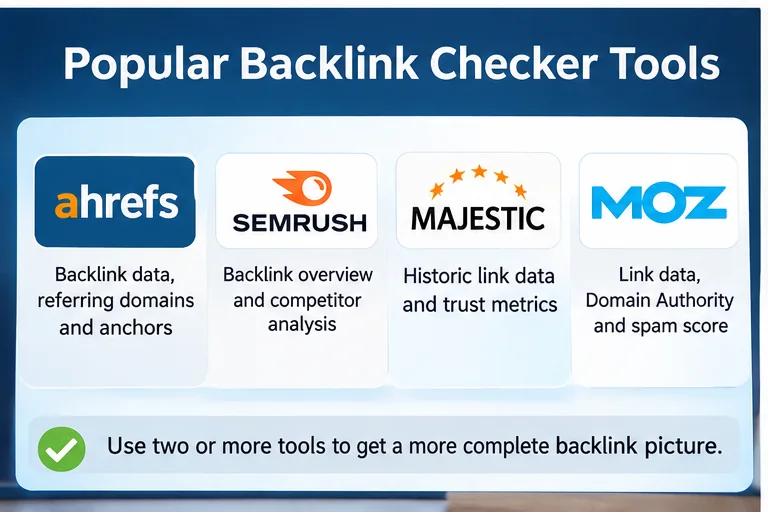
Free backlink checkers let you see a website’s top backlinks without paying. Enter a domain, run the check and review referring domains, anchors and follow status. Each free tool caps the rows you can see. Use two or three together when you research a competitor.
Every tool below works on any domain, including competitors. Here is how their free versions compare. The details come from each vendor’s own page:
| Free tool | What the free version shows | Data source | Best for |
|---|---|---|---|
| Ahrefs Backlink Checker | A preview of top backlinks and referring domains | Ahrefs’ own crawler | Quick look at strong links |
| Semrush free checker | Top backlinks, Authority Score, follow percentage, new and lost tags | Semrush’s own crawler | Checking without an account |
| SEO Review Tools | Up to 100 valuable backlinks, one per domain, with CSV export | Third-party API | Exporting a short list |
| OpenSEO | Summary metrics and top 15 backlinks, one per domain | DataForSEO index | Fast, no-signup check |
| Majestic | A free daily demo search plus account sign-up | Majestic’s Fresh and Historic indexes | Trust Flow and Citation Flow |
| Neil Patel Backlinks (Ubersuggest) | Backlinks with filters and a competitor view | Ubersuggest index | Spotting links rivals have |
The steps are the same in almost every tool:
- Paste the domain or exact URL into the search box.
- Pick the scope. “Domain” shows links to the whole site. “Exact URL” shows links to one page.
- Run the check and sort by referring domain strength.
- Note the strongest, most relevant linking sites.
- Export to CSV where the tool allows it.
Free tools are great for a first look. They are weak for real competitor research, because you only see the top slice of a profile.
Method 3: How to find every backlink with a paid tool
Paid tools like Ahrefs Site Explorer, Semrush Backlink Analytics and Majestic Site Explorer show a website’s full backlink profile. Use the Referring domains report first. Then filter the Backlinks report for followed links, one link per domain and new or lost links. Export the filtered list for outreach.
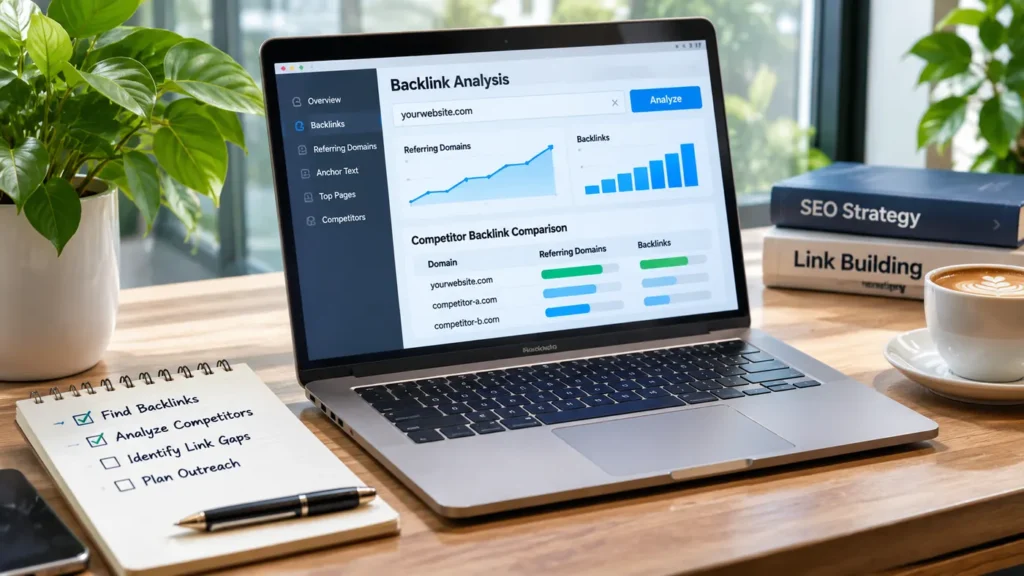
Learning how to find backlinks at scale mostly means learning a few reports. The names differ slightly by tool, but the workflow is the same.
Start with referring domains
Open the Referring domains report. It lists each unique site linking to the target. Sort by authority, then by estimated traffic. A site with real organic traffic is usually a real publication.
Filter the backlinks report
Switch to the Backlinks report and apply three filters:
- Followed links only, to see links that pass the most value.
- One link per domain, to remove sitewide footer duplicates.
- New or lost, to see recent wins and recent drops.
Find the most linked pages
Ahrefs calls this report Best by links. It shows which pages on a site earn the most links. Add the 404 filter and you get broken pages that still have links pointing at them. That list is a ready-made broken link building target.
Check anchors and context
Review the anchor text report. A natural profile is mostly brand names, URLs and descriptive phrases. Majestic’s Link Context report also shows where on the page a link sits. That helps you separate editorial links from footer links.
How to find your competitors’ backlinks step by step
To find competitor backlinks, first choose the sites that outrank you for your target keywords. Enter each domain or top-ranking URL into a backlink tool. Review their referring domains and most linked pages. Then note the links you could realistically earn too, such as roundups, resource pages and guest posts.
Most people pick the wrong competitors. Your business rival is not always your search rival. The sites to study are the ones ranking above you for the keywords you want.
Here is how to find backlinks of competitors in five steps:
- List your SERP competitors. Search your three most important keywords. Write down the domains that appear in the top five.
- Check their domains. Run each one through a backlink tool and note their referring domain count.
- Check their ranking pages. Run the exact URL that outranks you. Page-level links often explain a ranking better than domain totals.
- Open their most linked pages. These show which content formats earn links in your niche.
- Tag each linking site by type. Common types are roundup, resource page, guest post, news mention, directory, partner page and podcast.
That last step is where the value lives. Patterns tell you which tactics to copy. If three rivals all appear in the same “best tools” roundup, that roundup is your first target.
How to run a backlink gap analysis
A backlink gap analysis finds websites that link to your competitors but not to you. Enter your domain and up to four competitors into Ahrefs Link Intersect or the Semrush Backlink Gap tool. Filter for sites linking to two or more rivals. These are your warmest prospects because they already cover your topic.
Knowing how to find backlinks is useful. Knowing which ones you are missing is what actually moves rankings.
Run it like this:
- Enter your domain and three or four SERP competitors.
- Set the tool to show sites that link to at least two competitors but not to you.
- Export the results.
- Paste them into a gap sheet and score each row.
Use this template for your gap sheet. Copy the columns into Google Sheets or Excel:
| Column | What to enter |
|---|---|
| Referring domain | The linking website |
| Links to competitors | How many of your rivals it links to |
| Links to you | Yes or no |
| Authority score | DR, AS or Trust Flow from your tool |
| Estimated traffic | Organic traffic estimate for the site |
| Topical fit | 1 = loose, 2 = related, 3 = same topic |
| Link type | Roundup, resource page, guest post, news, partner |
| Contact | Editor name and email |
| Priority score | Topical fit + competitors linked, out of 7 |
| Status | Not started, pitched, live |
Sort by priority score and start at the top. A site that links to three rivals and covers your exact topic is worth more than a big site from another niche.
Once you have the list, the work shifts to earning those links. Our guide on how to get backlinks with 21 proven strategies covers what to do with each link type.
How to search for backlinks with Google, no tool needed
You can find some backlinks for free with Google search operators. Search for your brand name in quotes and exclude your own site with -site:. This surfaces pages that mention or link to you. Google stopped supporting the old link: operator in 2017, so it no longer works.
This method is slower, but it finds mentions tools sometimes miss. Try these searches:
- “YourBrand” -site:yourdomain.com
- “yourdomain.com” -site:yourdomain.com
- “CompetitorBrand” “best” -site:competitor.com
- “CompetitorBrand” intitle:review
The first two show pages that mention you. Some will link, and some will be unlinked mentions you can ask to turn into links. The last two surface roundups and reviews that feature a rival.
Operators are a good habit, but they will never give you a full profile. Use them to spot opportunities, not to count links.
Why do backlink tools show different numbers?
This is the most common frustration when people learn how to find backlinks.
Backlink tools show different numbers because each one runs its own crawler and keeps its own index. They also filter data differently and refresh on different schedules. Google Search Console shows only a sample of what Google found. No single source is complete, so compare two sources and track trends over time.
The vendors publish very different index facts. Ahrefs reports about 35 trillion historical external backlinks and says it refreshes its index every 15 minutes. Semrush reports more than 43 trillion backlinks and says its database refreshes at least hourly. Majestic splits its data into two parts. Its Fresh Index covers the past 120 days, and its Historic Index goes back to 2006.
Other reasons numbers drift apart:
- Crawl coverage. Small sites get crawled less often, so new links appear later.
- Filtering. Some tools remove spam or duplicates before showing results.
- Counting rules. Sitewide links can count as one link or thousands.
- Lost links. Some tools keep dead links in historical views.
Pick one main tool and stick with it. Consistent data shows real trends, even if the totals differ from another tool.
What should you look for once you find backlinks?
Look at relevance first, then real traffic, link placement, anchor text and link attribute. A link from a relevant site with genuine visitors matters more than a high authority score. Flag links from unrelated or spammy sites, but do not panic. Google ignores most low-quality links on its own.
Use this quick checklist for every link worth noting:
- Does the linking site cover your topic?
- Does it earn real organic traffic?
- Is the link inside the main content, not a footer?
- Is the anchor text natural?
- Is it followed, or marked nofollow or sponsored?
We explain why topical relevance matters more than domain rating in a separate guide. Before you pitch the sites you found, read our checklist on how to vet a guest posting opportunity. It helps you avoid link farms.
How often should you check your backlinks?
Check your own backlinks once a month and competitor backlinks once a quarter. Set up new and lost link alerts in your backlink tool so you see important changes as they happen. Check right away after a site migration, a ranking drop or a big outreach campaign.
A monthly review catches lost links early. You can often recover them with a quick redirect or a polite email. Quarterly competitor checks show you which new tactics rivals are using.
Turning your research into links
Finding backlinks is the research phase. Earning them is the outreach phase, and that is where most of the time goes.
Each link type needs its own approach. Roundups need a reason to include you. Resource pages need a useful asset. Publications need a strong pitch, which is why we favor manual outreach over automated blasts. Some gaps call for a guest post on a relevant site. Others suit a niche edit on an existing article or a digital PR campaign.
Frequently asked questions about finding backlinks
How do I check backlinks in Google Search Console?
Log in to Search Console and select your verified property. Click Links in the left menu. Under External links you will see Top linked pages, Top linking sites and Top linking text. Click More on any table for the full view. Then click a page or site to see the source URLs. Use the export button to download the data as a CSV or to Google Sheets. Remember that Search Console shows a sample and only works for sites you own.
Can I see competitor backlinks for free?
Yes, with limits, and it is the easiest place to learn how to find backlinks for free. Free checkers from Ahrefs, Semrush, SEO Review Tools, OpenSEO and Ubersuggest all accept any domain, including competitors. Each shows only a slice of the profile, usually the strongest links. Run a competitor through two or three free tools and merge the results for a fuller picture. For a complete list and gap analysis features, you will need a paid plan. Backlink data is public web data, so checking a rival is normal practice.
How many backlinks does my website have?
The honest answer depends on the tool. Google Search Console shows the links Google has found, but only a sample. Third-party tools each report their own totals from their own crawlers. Focus on referring domains rather than total backlinks, because sitewide links can inflate the count. Pick one tool as your main source and track the trend each month. A steady rise in relevant referring domains matters more than any single total.
Why don’t tools show all my backlinks?
No tool crawls the entire web. Small or new sites get crawled less often, so their links appear later or not at all. Some tools also filter out spam, duplicates or links they consider low value. Search Console exports a sample rather than every link. Pages blocked from crawlers, or links added by scripts, may also be missed. Using Search Console plus one third-party tool gives you the most complete view.
What is a backlink gap analysis?
A backlink gap analysis compares your link profile with your competitors’ profiles. It finds websites that link to one or more rivals but not to you. Tools like Ahrefs Link Intersect and Semrush Backlink Gap automate it. The results are strong outreach prospects, because those sites already link to businesses like yours. Score each site by topical fit and how many rivals it links to, then pitch the highest scores first.
Does the Google link: operator still work?
No. Google stopped supporting the link: search operator in 2017. It no longer returns a reliable list of linking pages. Instead, search for your brand or domain name in quotes and exclude your own site with -site:yourdomain.com. That shows pages that mention you, some of which link. For a real list, use Search Console for your own site and a backlink tool for anyone else.
How long does it take for new backlinks to show up?
It varies by tool and by how often the linking page gets crawled. Large, popular sites are crawled often, so their links show up quickly. Links from small blogs may take days or weeks to appear. Search Console can take longer than third-party tools, because it reports only after Google crawls and processes the page. If a link you built is missing after a month, check that the page is live and indexable.
What is the difference between backlinks and referring domains?
Backlinks count every single link. Referring domains count the unique websites those links come from. If one blog links to you from 50 posts, that is 50 backlinks but only one referring domain. Most SEOs watch referring domains more closely. A new site linking to you is a stronger signal than one more link from an old one. Sitewide footer links are the most common cause of inflated backlink totals.
Final thoughts
Remember the user staring at two different backlink totals? Neither number was wrong. Each tool simply saw a different slice of the web.
That is the real lesson in how to find backlinks. Use Search Console for your own site and a checker for competitors. Let a gap analysis decide where to focus. Then track one source consistently over time.
My prediction is simple. As AI search grows, the useful question will change. It will move from “how many links?” to “which trusted sites mention us, and for what?” The methods above already answer that.
Have you found a link gap you are not sure how to close? Talk to our outreach team or read answers to common questions about our process. You can also see how a white-hat link building partner handles outreach for you, or browse more link building guides.